
Imagine listening to your own voice reading a script even though you never recorded it.
Now imagine cloning any voice, generating thousands of words of speech, creating podcast conversations, or even giving your AI assistant a real voice—all without paying monthly subscription fees.
Sounds unbelievable?
That’s exactly what Voicebox AI promises.
Unlike many AI voice generators that lock their best features behind expensive plans, Voicebox is completely free, open-source, and runs directly on your computer. That means your audio stays on your device, there are no API limits, and you don’t have to worry about monthly payments.
Whether you’re a YouTuber, content creator, developer, podcaster, educator, or business owner, Voicebox offers professional voice cloning tools that were once available only through paid platforms.
In this guide, we’ll explain everything about Voicebox in simple Indian English, including its features, installation, supported AI models, advantages, disadvantages, and whether it’s the right tool for you. This article is based on the tutorial transcript and the official Voicebox website information you shared.
What is Voicebox AI?
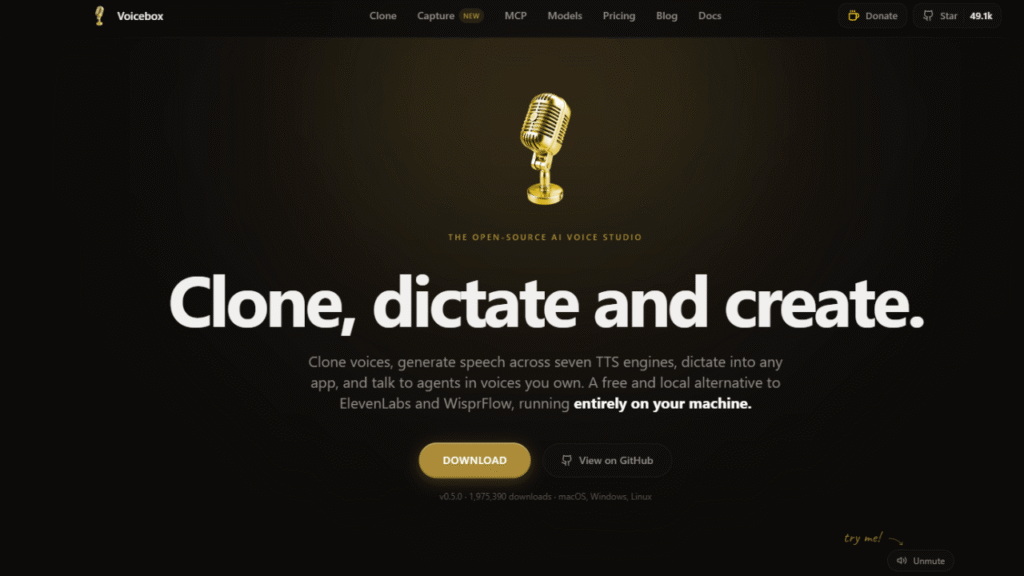
Voicebox is a free and open-source AI voice studio that lets you:
- Clone voices
- Convert text into speech
- Create AI voiceovers
- Build multi-speaker conversations
- Transcribe audio
- Add voice effects
- Use AI voices inside your own applications
The biggest difference is that everything runs locally on your own computer instead of sending your data to cloud servers. According to the official description, it supports Windows, macOS, and Linux, and is designed as a local alternative to services like ElevenLabs.
Why Is Everyone Talking About Voicebox?
Most AI voice generators require a monthly subscription.
Some even charge based on the number of characters you generate.
Voicebox takes a different approach.
Once you install it, you can generate speech on your own machine without paying per character or using API credits. The official site also highlights that it works offline after the required models are downloaded.
That’s why many creators are calling it one of the best free alternatives to premium AI voice tools.
Key Features of Voicebox AI
1. Clone Any Voice in Seconds
Creating a voice clone is simple.
You can:
- Upload an audio clip
- Record your own voice
- Capture audio from your computer
Voicebox can build a voice profile from a very short audio sample. The official documentation mentions it can clone a voice from as little as a few seconds of audio.
2. Generate AI Speech
Once your voice profile is ready, simply type any text.
Voicebox converts it into natural-sounding speech using your cloned voice.
You can generate:
- YouTube voiceovers
- Audiobooks
- Podcasts
- Announcements
- Narrations
- Educational content
3. Multiple AI Voice Models
One feature that makes Voicebox stand out is the number of AI speech engines it supports.
Some of the available models include:
- Qwen3-TTS
- Chatterbox
- Chatterbox Turbo
- LuxTTS
- Qwen CustomVoice
- TADA
- Kokoro
Each model focuses on different strengths, such as speed, multilingual support, natural expression, or long-form narration.
4. Stories Editor
Want to create a podcast with multiple speakers?
Voicebox includes a built-in timeline editor where different cloned voices can talk to each other.
You can:
- Add multiple speakers
- Move dialogue on a timeline
- Adjust pauses
- Create natural conversations
This is especially useful for podcasts, role-play videos, game dialogue, and storytelling.
5. Voice Effects
You can apply different audio effects like:
- Deep voice
- Echo
- Reverb
- Delay
- Compression
- Radio effect
These effects can help give your recordings a unique style.
6. Audio Transcription
Voicebox uses Whisper-based speech recognition to convert audio into text.
It automatically creates a transcript from your uploaded or recorded audio, which helps when building a voice profile.
7. Unlimited Text Generation
Many AI voice tools limit how much text you can generate.
Voicebox supports generating very long audio. According to the official information, it can handle up to 50,000 characters in one generation by automatically splitting and smoothly joining the output.
8. Local API for Developers
If you’re a developer, Voicebox also provides a built-in local REST API.
You can integrate it into:
- Desktop applications
- AI agents
- Games
- Automation tools
- Custom software
Because the API runs locally, there are no API keys or per-character fees required.
How to Clone Your Voice Using Voicebox
Getting started is easy.
Step 1: Download Voicebox
Visit the official Voicebox website and download the version for your operating system.
Voicebox is available for:
- Windows
- macOS
- Linux
Step 2: Install the Application
Install the software like any normal desktop application.
Step 3: Create a Voice Profile
Open the app and click Create Voice.
You have three options:
- Record your voice
- Upload an audio file
- Capture system audio
Step 4: Record Around 30 Seconds
Speak naturally.
Voicebox will automatically transcribe your recording.
If needed, you can edit the transcript before creating the profile.
Step 5: Generate Speech
Type your text.
Choose:
- Language
- Voice model
- Voice profile
Click Generate Speech.
Within a short time, your AI-generated voice will be ready.
Which Voice Model Should You Choose?
If you’re a beginner, Qwen3-TTS is a good starting point because it focuses on natural voice quality and lets you control delivery using simple instructions like “speak slowly” or “sound excited.” Other models may be better if you need faster generation, CPU-friendly performance, or long-form narration. The best choice depends on your hardware and the type of content you’re creating.
Who Should Use Voicebox?
Voicebox is suitable for:
- YouTubers
- Content creators
- Podcasters
- Developers
- Teachers
- Students
- Businesses
- Game developers
- AI developers
- Freelancers
If you create voice-based content regularly, Voicebox can save both time and money.
Pros
✅ Completely free
✅ Open-source
✅ Runs locally
✅ No subscription
✅ No API limits
✅ Works offline after setup
✅ Supports multiple AI voice models
✅ Voice cloning
✅ Multi-speaker conversations
✅ REST API for developers
✅ Available on Windows, macOS, and Linux
Cons
❌ Some AI models are large and need additional storage space before use.
❌ Voice generation speed depends on your computer’s hardware.
❌ Beginners may need a little time to understand the different voice models and settings.
Is Voicebox Better Than ElevenLabs?
Voicebox and ElevenLabs serve similar purposes, but they take different approaches.
Voicebox focuses on giving users a free, local, open-source experience, while ElevenLabs is a cloud-based commercial platform with paid plans and additional online services.
If your priority is privacy, offline use, and avoiding recurring subscription costs, Voicebox is an attractive option. If you need managed cloud services or features beyond what Voicebox currently offers, you may still prefer a commercial platform.
Final Verdict
Voicebox proves that you don’t always need an expensive subscription to create high-quality AI voices.
With voice cloning, multiple speech engines, audio transcription, a timeline-based stories editor, developer APIs, and local processing, it offers an impressive set of features for creators and developers alike.
The biggest advantage is that your voice data stays on your own machine, and after downloading the required models, you can keep generating speech without worrying about usage limits or recurring fees.
If you’ve been looking for a free way to experiment with AI voice cloning, Voicebox is definitely worth trying.
Frequently Asked Questions
Is Voicebox free?
Yes. Voicebox is free and open-source.
Does Voicebox work offline?
Yes. According to the official website, it runs locally on your computer after the required models are installed.
Can I clone my own voice?
Yes. You can create a voice profile by recording your voice or uploading a short audio sample.
Which operating systems are supported?
Voicebox supports Windows, macOS, and Linux.
Is Voicebox good for YouTube creators?
Yes. It can be used to create voiceovers, narrations, podcasts, and other spoken content.
Can developers integrate Voicebox into their apps?
Yes. Voicebox includes a local REST API that developers can use to build voice-enabled applications and workflows.